
Guidestar Guide
Achieving validation through Candid — the service formerly known as GuideStar — enhances your charity’s credibility and visibility. It reassures donors and stakeholders of its legal compliance and ethical standing, potentially increasing funding opportunities. This guide walks the current app.candid.org profile, section by section, so you can make the most of it.
Your Candid nonprofit profile — the service most people still know as GuideStar — is the main tool for helping you gather the information to complete our onboarding form. Profiles are now claimed and edited at app.candid.org, not on guidestar.org. Your goal should be to reach the highest level of completion (Candid Platinum). Get the highest level you can with the data you have. It takes roughly 2–3 hours to fully reach Platinum the first time and then 30 minutes a year to keep it updated. To be supported by Free For Charity, we require organizations to be at least Gold and to upload info for your board and IRS Designation Documents.
Two things worth knowing before you start: seals must be earned in order (you cannot skip to Gold), and a seal expires if the profile is not updated each year — you lose the seal and its benefits along with it. Renewing is quick: sign in, review each field for accuracy, add current-year data, and click Publish.
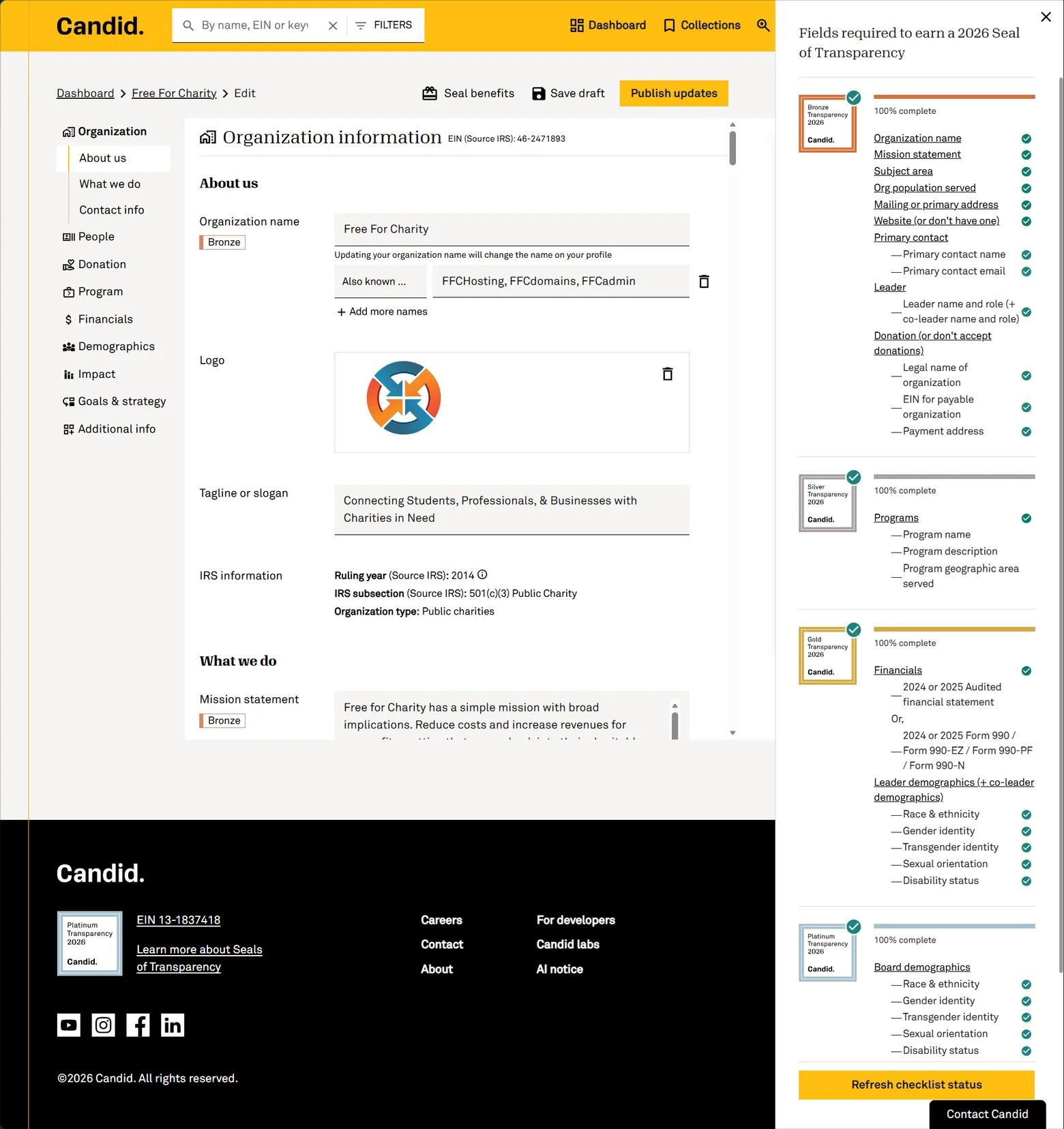
You do not have to track any of this by hand. The profile editor carries a “Fields required to earn a 2026 Seal of Transparency” panel down the right-hand side: each seal level shows a percent-complete bar and a green check against every field you have satisfied, and a Refresh checklist status button at the bottom re-scores it after you save. Individual fields in the form are tagged with the level they unlock, so a field marked “Bronze” is one standing between you and your Bronze seal. Work the panel top to bottom and you cannot miss a requirement.
1. Achieving Gold or Platinum Seal of Transparency
- Create an account: Go to app.candid.org and create a free account if you don’t have one. This is where profiles now live — the old guidestar.org “Update Nonprofit Profile” editor has been replaced by the Candid app.
- Find your nonprofit profile: Search for your organization using its name or Employer Identification Number (EIN).
- Claim the profile: Follow the prompts to verify your connection to the nonprofit. Only a designated staff member can claim the profile, but you can invite others later to manage it (Candid)(Candid Learning).
NOTE: If your nonprofit is already claimed, then the current management has to “Add Managers” to allow your email to update the profile.
Bronze is the “donors can find you and fund your work” tier. In the current editor these fields are spread across the Organization, People and Donation sections in the left-hand nav:
- Organization › About us: Organization name.
- Organization › What we do: Mission statement, subject area, and organization population served.
- Organization › Contact info: Mailing or primary address, and website (or tick “don’t have one”).
- People: Primary contact name and email, plus leader name and leader role (and co-leader name and role, if you have one).
- Donation: Legal name of organization, EIN for the payable organization, and payment address — or tick “don’t accept donations.”
- Publication: Once all required fields are completed, publish your updates to earn the Bronze Seal (Candid)(2026 Seals guide).
Silver is a single section — Program — and it is what guides funding decisions. Add each program you run:
- Required for each program:
- Program name
- Program description (the services provided)
- Program geographic area served
- Optional but worth doing: Program subject area and program population served — the target population that benefits from your services. The Program section now saves automatically as you type, so you can’t lose work partway through ( Candid ).
- Publication: After entering these details, publish to earn the Silver Seal (Candid)(2026 Seals guide).
Gold is the minimum Free For Charity requires. It covers two sections, Financials and Demographics. Note that Candid replaced the old “DEI” questions with a Demographics section — and at Gold it only asks about your leader, not your whole board.
- Financials: Upload one of the following, and it must come from the latest available fiscal year (for the 2026 seal that means 2024 or 2025):
- An audited financial statement, or
- Form 990, 990-EZ, 990-PF, or 990-N
- Demographics — leader (and co-leader): Race & ethnicity, gender identity, transgender identity, sexual orientation, and disability status. “Decline to state” and “We do not collect this information” are valid answers and still satisfy the requirement — you are never forced to disclose anything.
- Publication: Once financials and leader demographics are in place, publish your profile to obtain the Gold Seal (Candid)(2026 Seals guide).
Platinum adds three things on top of Gold: board demographics, at least one impact metric, and your goals and strategy.
- Demographics — board: The same five categories you answered for your leader (race & ethnicity, gender identity, transgender identity, sexual orientation, disability status), now for your board. “Decline to state” and “We do not collect this information” remain valid answers.
- Impact: At least one quantitative metric — a metric name and a value for the most recent completed year (2025 for the 2026 seal). This is the requirement organizations most often trip over: an older value alone will not unlock Platinum. Examples include:
- Number of individuals served
- Outcomes from specific programs (e.g., scholarships awarded, animals rehabilitated, etc.)
- Any relevant performance indicators specific to your mission
- Goals & strategy: Your organization’s goals, your strategies, and what you aim to solve. You do not need a formal strategic plan — past grant applications or board reports are usually enough to write these from ( Candid Learning ).
- Publication: After entering demographics, metrics, and goals, publish your updates to earn the highest level, the Platinum Seal. Published changes appear on your profile within about 15 minutes (Candid)(Candid insights).
2. Preparing to share your profile with Free For Charity
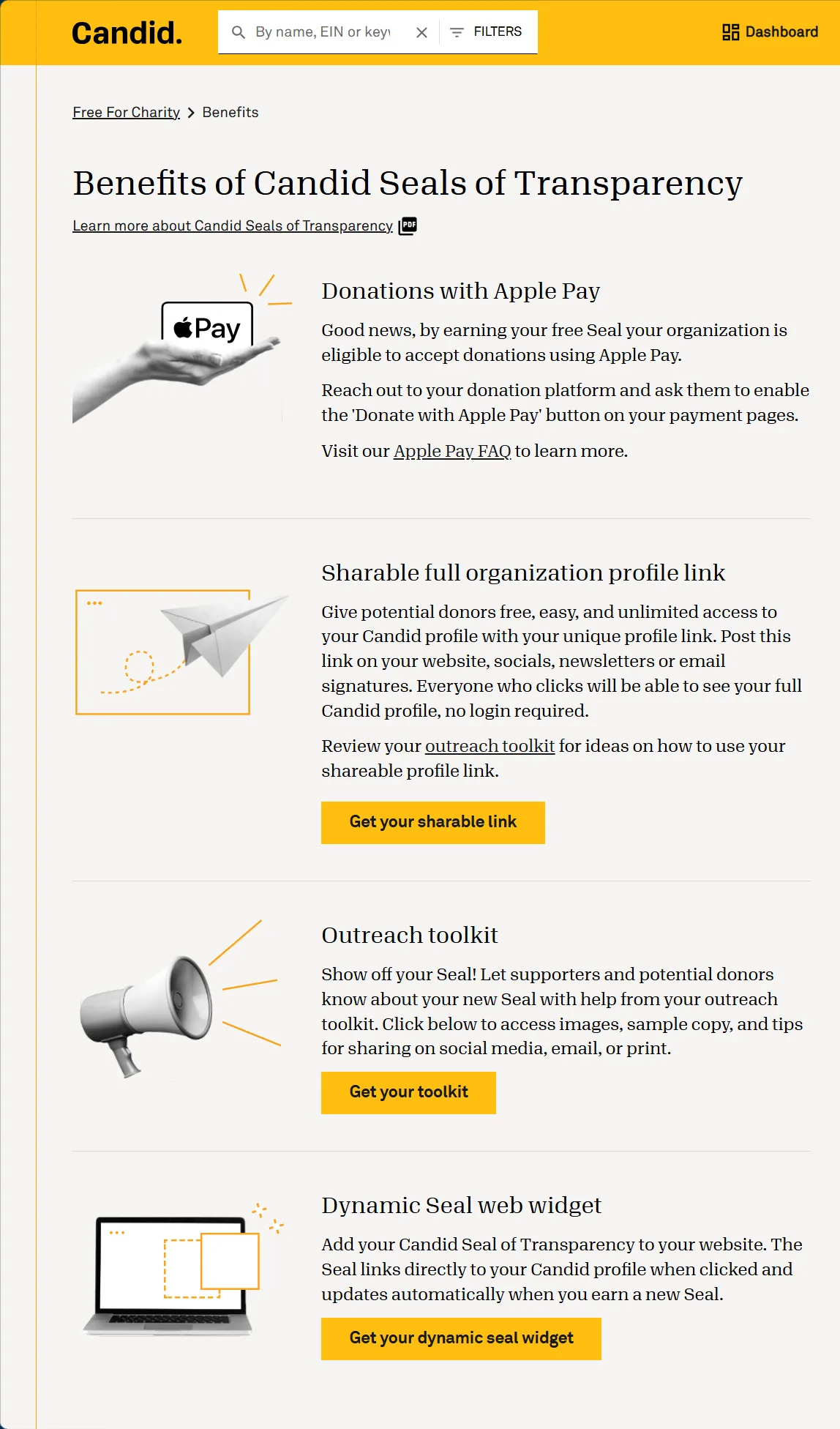
Once you have published, open the Benefits page — the Seal benefits button in the editor’s top bar, next to “Save draft” and “Publish updates.” (This replaced the old three-tab “Step 1: Update / Step 2: Publish / Step 3: Benefits” screen on guidestar.org, so older screenshots and walkthroughs will not match what you see.) Candid lists four things your seal unlocks:
- Donations with Apple Pay — your organization becomes eligible to accept Apple Pay; you ask your donation platform to enable the button.
- Sharable full organization profile link — the “Get your sharable link” button. Anyone who clicks it sees your full profile with no login required. This is the link the FFC onboarding form asks for.
- Outreach toolkit — “Get your toolkit” gives you images, sample copy, and tips for announcing your seal on social media, email, or print.
- Dynamic Seal web widget — “Get your dynamic seal widget” generates the embed code covered further down this page. Install it once and it updates itself each year you earn a new seal.
Here is an example of the links to copy into the FFC onboarding form:
(These are examples only — please copy the links from your own Candid profile. The old guidestar.org/profile/shared/… format is retired; current links are issued on app.candid.org.)
Candid gives you two different links, and the onboarding form asks for both. They look similar, so it is worth knowing what separates them:
1. Public Profile link. This is your profile’s permanent home — what anyone finds by searching Candid, and what you would put on a business card. It shows the public portion of your profile only. FFC’s:
https://app.candid.org/profile/9326392/free-for-charity-46-24718932. Full Profile (sharable) link, from Benefits › Get your sharable link. Same profile, but the pkId on the end unlocks the full profile — everything you filled in — for anyone who clicks, with no Candid login and no limit on views. That is why FFC asks for it: we can verify your seal-level data without an account. Note the slug is slightly different from the public link; copy the whole URL, query string and all, because dropping the ?pkId=… silently turns it back into an ordinary public link. FFC’s:
The number both links share (9326392) is your Candid nonprofit id. You will need it again for the seal embed below, and it is not the same as your EIN — the EIN is the 46-2471893 on the end of the public slug.
3. FFC Candid Seal Code. Not needed for the onboarding form, but you will need it later, when you put the seal on your own site. The link inside this snippet is a third variant again — Candid pairs the public slug with the pkId — so take it from the widget page rather than assembling it yourself:
Put your seal on your website — and never update it again
Don’t upload the seal as an image file: a saved image goes stale the moment you renew (we learned this on our own site). Use the embed from Benefits › Get your dynamic seal widget instead — the seal is served live from Candid keyed to your profile, so the year and level update automatically every time you publish, and one install carries you through every future seal. This is what Candid hands you, with FFC’s values filled in:
<a aria-label="Free For Charity" href="https://app.candid.org/profile/9326392/free-for-charity-46-2471893/?pkId=7232730a-03b5-467f-a82c-443dcd2122ed" target="_blank">
  <img alt="Candid Seal of Transparency"
       src="https://widgets.guidestar.org/prod/v1/pdp/transparency-seal/9326392/svg" />
</a>
Paste your own version rather than this one: both the 9326392 id and the pkId are specific to FFC. One change we do recommend making to the code Candid gives you — it ships the image with an empty alt="", which leaves screen-reader users with nothing. Set it to alt="Candid Seal of Transparency" as shown above.
(The seal above is exactly this embed running with FFC’s own id, 9326392 — as is the seal in this site’s footer.) If FFC hosts your website, just send us your nonprofit id and we’ll add it for you.
Please keep your Candid profile handy while filling out the FFC onboarding form. A significant portion of the information we require can be copied over from what you provided to Candid while achieving your Seal of Transparency.
Have questions about consultation or hosting? Want to know more about nonprofits? Looking to chat? Give a real person a call:
Clarke Moyer (520) 222-8104